One click to export all votes on a LinkedIn poll. Enrich Email with Email Finder API
Get started - it's free






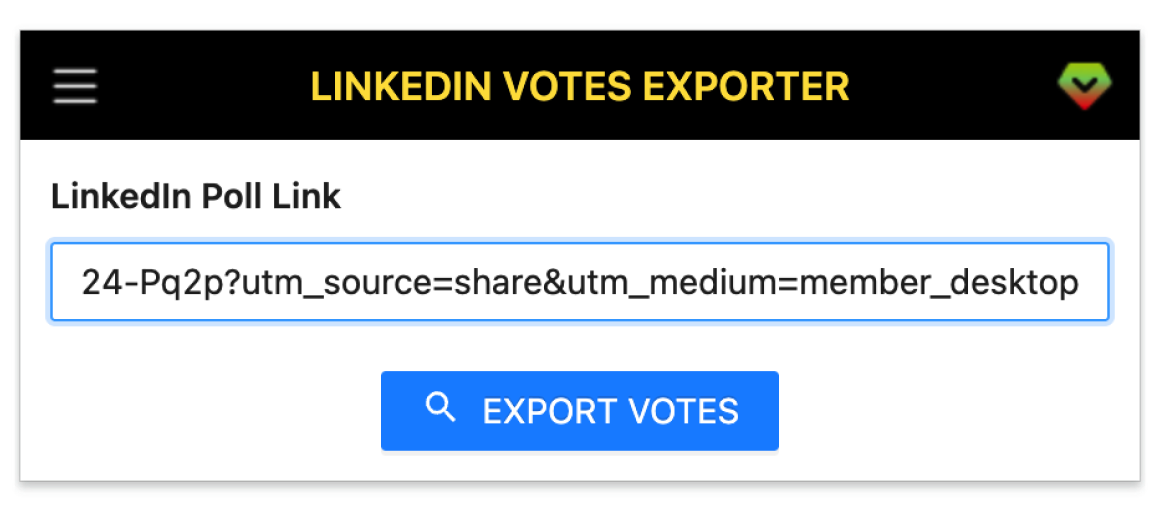
A smart tool to automate how you extract users with email who have voted in any LinkedIn poll you post.
Capture every vote from any LinkedIn poll you posted, without missing entries.
Grab voter name, headline, company, school and more profile details.
Connect Apollo, Hunter, Snov, Datagma and more to enrich emails automatically.
Download results as CSV, Excel or JSON for instant analysis and outreach.
Open a poll, click the extension, export—no manual copy‑paste required.
Runs in your browser; no LinkedIn password required. Export only what you see.
Get started in a few simple steps.
Add LinkedIn Poll Votes Export to your browser.
Copy your LinkedIn poll URL and paste it into the extension.
Hit Export, then download and save your CSV/Excel/JSON.
How teams use LinkedIn Poll Votes Export in their daily workflow.
Turn poll voters into warm leads, find emails, and start personalized outreach.
Identify engaged candidates from hiring/poll posts and contact them faster.
Analyze voter segments, validate messaging, and build targeted campaigns.
Follow up with participants, invite to webinars, and keep engagement high.
Gauge demand through polls and quickly reach respondents for discovery calls.
Collect structured datasets of voters for surveys and academic/market research.
Fields included in exported datasets.
| Field | Description | Example |
|---|---|---|
| Public Identifier | LinkedIn profile public identifier. | john-doe-12345 |
| Profile Link | Direct URL to the LinkedIn profile. | https://www.linkedin.com/in/john-doe |
| Full Name | Voter's full display name. | John Doe |
| Subtitle | Headline/subtitle shown under the name. | Senior Product Manager at Acme |
| Picture URL | Profile avatar image URL. | https://media.licdn.com/dms/image/C4D03AQ... |
| Answer | The option the voter selected in the poll. | Option A: Product Analytics |
| Degree | Connection degree (1st, 2nd, 3rd). | 2nd |
| Company Name | Company name from current experience. | Acme Inc. |
| Job Title | Current role title. | Senior Product Manager |
| Employment Type | Employment type of current role. | Full-time |
| Company Industry | Industry of the company. | Information Technology & Services |
| Company Location | Location associated with the role or company. | San Francisco Bay Area |
| Job Date Range | Date range for the current position. | Jan 2022 – Present |
| Company Employee Count | Estimated employee size bracket. | 201-500 |
| Company ID | LinkedIn internal company ID if available. | 1234567 |
| Company Universal Name | Company universal handle/slug if available. | acme |
| Company URL | Company page URL. | https://www.linkedin.com/company/acme |
| School Name | School from latest education. | Stanford University |
| Degree Name | Degree name from education. | MS |
| Field Of Study | Field of study/major. | Computer Science |
| Education Date | Education date range or graduation year. | 2015 – 2017 |
| Industry Name | Profile's primary industry. | Information Technology & Services |
| Summary | About/summary text when available. | Product leader with 10+ years in B2B SaaS. |
| Skills | Top skills list when available. | Product Management, Go-to-Market, SQL |
| Certifications | Key certifications when available. | PMP; AWS Cloud Practitioner |
| Projects | Highlighted projects when available. | Poll Analytics Dashboard |
| GEO Location Name | Geographic location name. | San Francisco Bay Area |
| GEO Country Name | Country name resolved from location. | United States |
| Prefer Country Code | Preferred country ISO code if available. | US |
| Prefer Language Code | Preferred language code if available. | en |
| Birth Date | Birth date if public (YYYY-MM-DD). | 1990-05-12 |
| Is Creator | Whether the profile has Creator Mode. | true |
| Is Influencer | Whether LinkedIn marks as Influencer. | false |
| Is Premium | Whether the user has LinkedIn Premium. | true |
Where you can get answers to common questions about LinkedIn Poll Votes Export
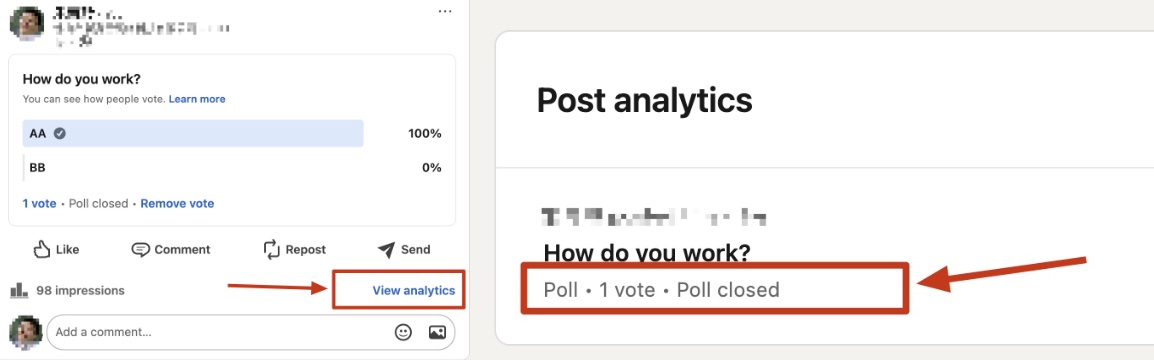 Please follow the instructions and then copy the URL from the address bar. The link should look like this: https://www.linkedin.com/feed/update/urn:li:activity:1234567890/ and not like this: https://www.linkedin.com/posts/john-1234_activity-1234567890
You don’t have to take our word for it
We turn poll voters into warm leads in minutes. Export + email enrichment replaced hours of manual copy‑paste for our team.
Michael
Sales Operations
Perfect for audience research. I export voters to CSV, segment by company and role, and launch targeted campaigns the same day.
Jessie
Marketing Manager
Hiring polls became a goldmine. I identify engaged candidates and follow up with personalized messages—pipeline quality improved immediately.
Priya
Technical Recruiter
I validated demand and booked 12 discovery calls from one poll. Exporting voters with profiles made outreach incredibly fast.
Marco
Founder
One‑click export, Apollo enrichment, sequences in Outreach—done in an afternoon. This tool fits perfectly into our stack.
Elena
Growth Marketer
I follow up with voters to invite them to events and webinars. Engagement and attendance are both up since using this.
Hannah
Community Manager
Clean, structured datasets from polls—CSV and Excel exports drop right into my analysis workflow. Huge time‑saver.
 David
Research Analyst
David
Research Analyst
Great for internal mobility and referral programs. I quickly identify interested employees and reach out with confidence.
 Sofia
HR Business Partner
Sofia
HR Business Partner
Paste your LinkedIn poll link, click Export, and download all voters with profile details as CSV/Excel/JSON.
All Pro plans come with a 7-day money-back guarantee. No questions asked.